Config layering: how a value is resolved and delivered
On this page
A setting travels a long way between where it is declared and where a script reads it. This covers both halves: which stored config applies to a given game and runtime, and how the resolved values reach your scripts as environment variables.
Config sets: platform, fork, and version
A config document is not stored on its own. It belongs to a config set, which is tagged with three extra values alongside the game it applies to:
| Tag | Meaning | Example |
|---|---|---|
platform | Which launcher this config is for | Proton, Dosbox, RetroArch |
forkname | A variant of that platform | dosboxx, staging |
version | A specific version of the platform or fork | 1-0, 9-0-4 |
That is what lets one game carry different settings under different runtimes. The DOSBox config for a game is a different config set from its ScummVM config, and both can exist at once without interfering.
How a config set is chosen
When Junk Store Pro needs a game’s config it knows the platform, fork, and version in play, and looks for the most specific stored set that fits. A stored set matches when each of its three tags is either exactly equal to what is being asked for, or empty.
Empty means “applies to anything”. So a set tagged with nothing at all matches whatever is being asked, and a set tagged platform=Dosbox, forkname=dosboxx matches only when that fork is actually in use.
Where several sets match, they are ordered by platform, then fork, then version, with non-empty tags sorting ahead of empty ones, and the first is taken.
One set is chosen, not several combined. This is the part worth being precise about. If a game has both a general set and a DOSBox-specific one, running under DOSBox uses the DOSBox set instead of the general one, not on top of it. The tags select which stored set applies; they are not tiers that stack.
That is why saving a config records only the values that differ from what was inherited, as described under Parents. The set that gets chosen has to be complete enough on its own, so the values it does not carry come from the layers described next rather than from another set.
Forks and versions are just strings
Nothing validates these values when they are stored. They are text in the database, compared for equality, so a fork or version that only you use is matched exactly as a shipped one would be.
The controls are more restrictive than the storage, which is the thing to know. platform is a dropdown built from the installed launchers, so it offers exactly the platforms that exist. platform-fork is a dropdown too, but a fixed one: empty, dosbox, dosboxx, and staging. platform-version is a plain text field and takes anything.
So a fork name of your own is not in the list, and you have to type it with the Y gesture described below. Once stored it behaves exactly like a shipped fork name, because the matching only ever compares strings.
That is what makes this useful for your own setups. If you build a patched DOSBox, or keep two Proton builds side by side, you can give each a fork name of your choosing and hang its own config off it. Junk Store Pro does not need to know the name in advance.
To use one:
- Set
platform-forkon the game or the store, in the Advanced section, to whatever name you chose. The field can be typed by hand even when the dropdown does not offer your value, using the Y gesture described in Editing a field by hand. - Make sure a launcher scriptlet exists for that platform, and that it understands your fork name. The scriptlet is the part that has to act on it; the config system only carries the value. See launchers: how games start.
- Configure the game normally. The settings you save are stored against that fork, so they apply only when it is selected.
platform-version behaves the same way and can be combined with a fork.
Per game rather than per store
Because the tags include the game, this is also the mechanism behind per game settings. The game config screen writes a config set for that one game, which is why a single game can run under a different Proton version or emulator core without changing anything for the rest of the store. See Tab config versus game config.
Configs are merged rather than replaced, so a game level set only needs the values that differ from the store level one.
From config value to environment variable
Once the applicable config is resolved, its values are handed to your scripts as environment variables. The rule is mechanical and predictable, and more involved than it first appears.
The naming rule
A setting becomes an environment variable by combining its section and its key:
<SECTION>_<KEY>
Both are upper cased, and spaces and hyphens become underscores. So:
| Section | Key | Variable |
|---|---|---|
| General | ROMS_EXT | GENERAL_ROMS_EXT |
| RetroArch | Retroarch core | RETROARCH_RETROARCH_CORE |
| Advanced | platform-version | ADVANCED_PLATFORM_VERSION |
| RSYNC | SSH_HOST | RSYNC_SSH_HOST |
That is why the launcher scriptlets contain names like GENERAL_ROMS_EXT and RETROARCH_RETROARCH_CORE. The doubled word in the last one is not a mistake: the section is RetroArch and the key is also Retroarch core.
Two exceptions to the prefix
The ENVIRONMENT section is never prefixed. Settings in that section become plain variables, so LANG stays LANG rather than becoming ENVIRONMENT_LANG. That is the point of the section: it exists to set real environment variables the game or runtime expects.
Individual settings can opt out. A setting marked as having no prefix becomes a bare variable too, wherever it lives. USE_LEGACY_CLIENTS is one of these.
Two variables you always get
Regardless of configuration, every script is given:
| Variable | Value |
|---|---|
STORE_NAME | The store name, for example Epic |
PYTHONPATH | The extension directory, so python helpers such as junklib.py can be imported |
How a launcher scriptlet actually receives them
The variables do not simply appear in the environment. A launcher scriptlet asks for them, and the shape of that request is visible in the shipped Proton scriptlet:
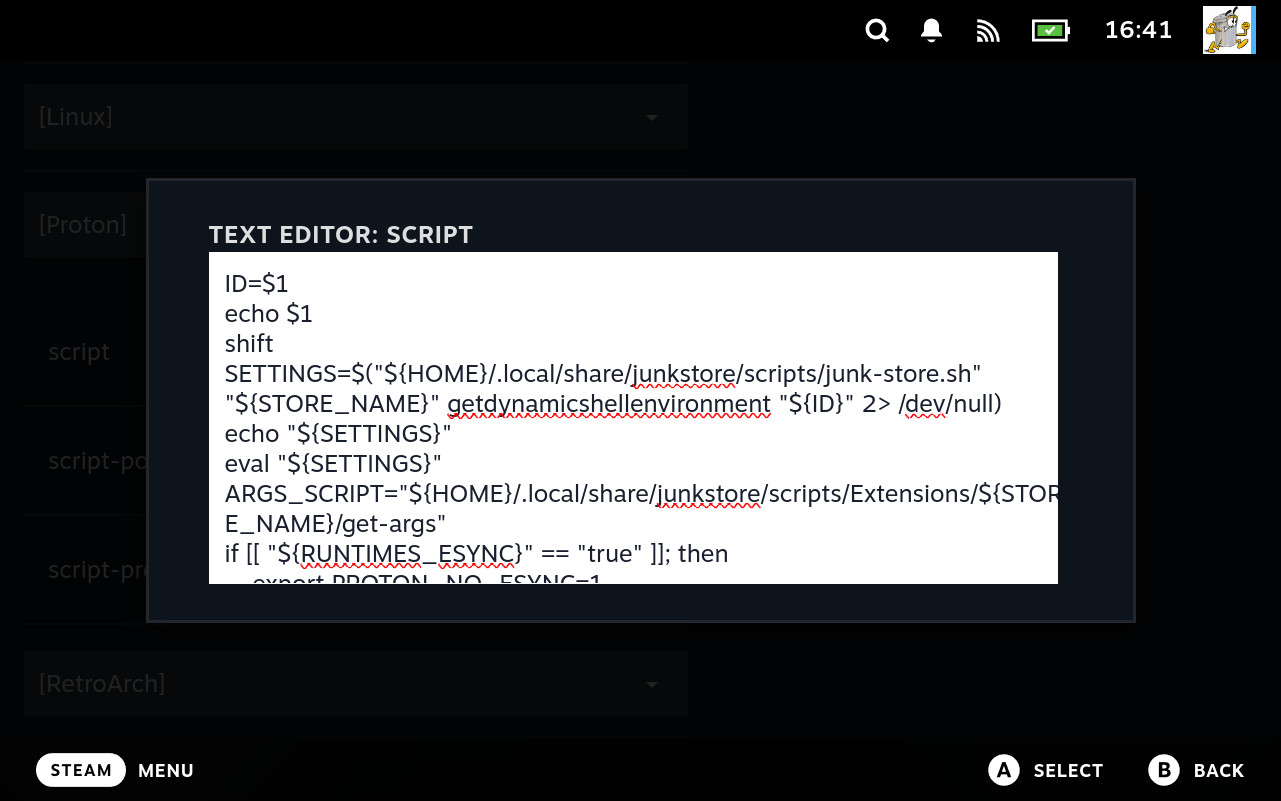
The two lines that matter are the request and the evaluation:
SETTINGS=$("${HOME}/.local/share/junkstore/scripts/junk-store.sh" \
           "${STORE_NAME}" getdynamicshellenvironment "${ID}" 2>/dev/null)
eval "${SETTINGS}"
getdynamicshellenvironment resolves the layers for that one game and prints the result as shell assignments; eval brings them into scope. Everything after that line can read ADVANCED_PLATFORM, RUNTIMES_ESYNC, and the rest by name, which is what the naming rule above is for.
This is also the point where a setting stops being data and becomes behaviour. A few lines further down, the scriptlet translates the RUNTIMES_* settings into the variables Proton itself reads:
if [[ "${RUNTIMES_ESYNC}" == "true" ]]; then
    export PROTON_NO_ESYNC=1
else
    export PROTON_NO_ESYNC=0
fi
So a checkbox in the config editor becomes an environment variable a runtime understands. Note that the translation is not always a rename, and the shipped scriptlet is the authority on which way round a given pair runs.
The screenshot is the multi-line editor described in Editing a field by hand, which is how these fields are edited in practice. The launchers editor presents them as single line inputs, and a scriptlet is far longer than one line.
Empty values are omitted
A setting with an empty value produces no variable at all, rather than an empty one. So a script should handle a variable being unset, not merely empty:
if [[ -n "${RSYNC_SSH_HOST}" ]]; then
    # only when actually configured
    rsync_to "${RSYNC_SSH_HOST}"
fi
The whole chain, from Generator to running script
Before the layering, it helps to see how far this reaches. A setting is not just a value in a database; it travels through the entire system, and the same definitions are used at each step.
Generator definition
    the sections and fields an extension has, with types and defaults
        |
        v
Generation
    writes the extension's scripts, and records the config sections
        |
        v
Config sets in the database
    values recorded against platform, fork, version, and game
        |
        v
Resolution
    the layers below are merged into one set of values
        |
        v
Environment variables
    SECTION_KEY pairs handed to scripts and launchers
        |
        v
Your script or launcher scriptlet
    reads them from the environment
Two consequences worth holding on to:
- The defaults you see in a fresh extension come from the Generator’s own definition of the config sections. They are not hardcoded somewhere separate. That is why the settings reference and the Generator editors describe the same fields.
- A change at any step flows to everything downstream, but only after regeneration. Editing a definition does not alter a running extension until the scripts are written out again.
The Generation step is itself a merge
The diagram shows one arrow into generation, which understates it. The tab config an extension ends up with is assembled from several sources, combined in order, each one overlaying the one before:
- Built in defaults for the extension’s kind, which is what a brand new extension would have with nothing configured.
- The Generator’s Tab configs for this extension.
- The Generator’s game config for this extension.
- The
<store>tabconfig.jsonalready on disk, if the extension has been generated before.
Later sources win. So a value set in Tab configs overrides the built in default, and a value already present in the generated file overrides both.
That last point is the one worth knowing, because it is not what people expect: regenerating does not reset an extension to the Generator’s values. What is already on disk takes part in the merge, so generation is closer to bringing a file up to date than to rewriting it from scratch. If you have changed something in the generated config and want the Generator’s value back, changing it in the Generator alone will not do it.
The result then has defaults filled in for anything still unset, and inheritance markers stripped, before being written out.
This is genuinely intricate, and worth reading twice if you are debugging a value that is not what you expected. The short diagnostic: check the generated <store>tabconfig.json first, because if the value is in there it wins over anything you set in the Generator.
Presets deliberately drop machine specific values
When an extension is packaged as a preset for sharing, some settings are left out on purpose: the SSH user, SSH host, ROMs path, and the use SSH flag. Those describe your machine and network, not the extension, so they do not travel to whoever imports it.
Expect to fill those in again after importing someone else’s preset. Their absence is the design working, not a broken import.
How settings are layered
The value a script sees is not simply “whatever is in the game config”. It is the result of merging several layers in order, where later layers overwrite earlier ones.
This is the layering, and it is separate from the config set tags above. The tags decide which stored set is read; these layers decide what happens to it once it is. A stored set sits at the top of this stack, on a base of schema defaults and generated values.
The layers
From the bottom up:
- The raw schema defaults. What settings exist and the value each has when nothing else says otherwise. This is the base, so a setting nobody has touched still has a value.
- The Generator’s values for the extension. What the extension was created with. For an extension made by the wizard, this is where your answers landed.
- The extension’s own config, the cog menu. What you set on the store afterwards.
- The game’s config. The most specific layer, applying to one game.
The documented defaults are the raw ones
This is worth being clear about, because it surprises people.
Settings reference lists the raw default for each setting. That is what the setting is worth in the absence of anything else, and it is useful for understanding what a field means.
It is often not what your extension actually has. Generation writes values at level 2, so a generated extension starts with the Generator’s choices rather than the raw defaults.
The wizard makes this obvious. Answer its questions and it records, among others:
| Setting | Raw default | What the wizard writes for an emulator |
|---|---|---|
| Data source | empty | Libretro |
| Base Url | empty | the Libretro thumbnails address |
| Use proxy cache for images | false | true |
| Download method | script | none or rsync, from your answer |
| Roms in root | true | depends on the emulator you chose |
| Install Directory | Games/<Name> | Games/<Name> for the name you gave |
So an emulator extension arrives with artwork already configured and a download method already chosen. None of that is the raw default; all of it came from level 2.
The practical rule: read the settings reference to learn what a field does, and read your own extension to learn what it is set to. For the latter, do not guess from the documented default. See the section below on seeing the resolved result.
Merging is per option, not per section. A later layer that sets one option in a section overrides only that option and leaves the rest of the section intact. This is why setting one field on a game does not discard everything else it inherits.
Specificity, and why empty means “any”
Configuration is stored against a combination of platform, fork, and version. When Junk Store Pro looks for the settings to apply, a stored row matches if each of those fields either equals what it is looking for or is empty, where empty means “applies to anything”.
Among the rows that match, the most specific wins: platform first, then fork, then version.
The practical effect is a fall-back. A row recorded with everything empty is used whenever nothing more specific exists, and a more specific row takes over completely when it does. The general row is not consulted as well, so the specific one has to carry what it needs.
That is less onerous than it sounds, because a config is saved with only the values that differ from what it inherited, and the rest come from the layers described earlier: the schema defaults, then the Generator’s values, then the store’s own config.
Autoexec is appended, not replaced
Most settings overwrite when a later layer sets them. The autoexec text is the exception: layers are concatenated, so a game’s autoexec lines are added to whatever it inherits rather than replacing it.
The live tab configuration is not in generator.db
The natural model is that the definition lives in the Generator’s database and everything downstream is generated from it. Generation does not overwrite an existing <store>tabconfig.json, it preserves what is already there.
For most settings that never shows, because you set them in one place. For Download method and Data source it matters, because those are commonly set through the tab configuration UI, which writes to that file directly.
Three consequences follow:
- A value set only in the definition does not reach a machine that has already generated. The file wins.
- Importing a preset containing them has no effect for the same reason. The import succeeds, and the file keeps what it had.
- A value set only through the interface is not in your export. It was never in the definition, so it does not travel.
So set both when you are building an extension to share, or delete the generated file and regenerate so the definition is written out fresh.
Known issue. Nothing indicates the exception, and every one of these fails silently. See Settings for what that looks like in practice.
Seeing the result
Rather than reasoning about the layers, ask Junk Store Pro what it computed. Two actions exist purely to expose the resolved configuration as shell assignments:
| Action | Gives you |
|---|---|
TabShellEnvironment | The resolved settings for the store |
GameShellEnvironment | The resolved settings for one game |
The launcher uses both, evaluating the output to define the variables. You can run the same thing by hand to see exactly what a script will receive:
~/.local/share/junkstore/junk-store MyStore TabShellEnvironment
~/.local/share/junkstore/junk-store MyStore GameShellEnvironment some-game
The output is a series of export lines. If a variable you expected is missing, the setting is empty at every layer. If the value is not what you set, a more specific layer is overriding it.
This is the fastest way to debug a settings problem, and much more reliable than guessing which layer won.
Writing scripts against this
A few habits that follow from the above:
- Read from the environment, do not take settings as arguments. The shortname is the argument; everything else arrives as a variable.
- Assume a variable may be unset, since empty settings are omitted entirely.
- Use the prefixed name. A setting in the
Generalsection isGENERAL_<KEY>, not<KEY>, unless it is inENVIRONMENTor explicitly unprefixed. - Check with the two shell environment actions before assuming a variable exists.