Junk Store FAQ
Getting Started 6
How do I install Junk Store? Version Specific
Junk Store Pro: Two ways to install: pick whichever feels easier.
Quick install (recommended): Our installer handles the whole setup for you (login, build branch, storefront extensions, install).
Manual install:
1. Go to Desktop Mode
2. Log into the portal
Quick install (recommended): Our installer handles the whole setup for you (login, build branch, storefront extensions, install).
- Double-click installer: Download
junkstore-installer.desktop, drag it onto your Desktop and double-click. - Konsole one-liner: Paste
curl -fsSL https://i.junkstore.xyz/i/bootstrap.sh | bashinto Konsole.
Manual install:
1. Go to Desktop Mode
2. Log into the portal
- Go to the portal and log in with your account credentials.
- If you can't remember your password, use the reset option on the login page.
- Download the latest
js_probuild from the portal - Open Dolphin → Downloads → Right-click the file → Properties → Permissions
- Mark it as executable and click OK, then double-click to install
⚠️ CRITICAL: When installing Junk Store Pro, you MUST wait until the dialogue box says "Installation Complete" before clicking OK. Clicking the OK button too early cancels the installation process.
Note: For full install and set up instructions please refer to our How to Install Junk Store Pro
Decky Plugin: The Junk Store Decky plugin requires Decky Loader to be installed first on your Steam Deck.
- Install Decky Loader by following the official Decky installation guide
- Once Decky is installed, access the Decky Plugin Store from your Quick Access Menu
- Search for "Junk Store" and install the plugin
- The plugin will appear in your Decky menu after installation
How do I access Junk Store after installation? Version Specific
Junk Store Pro: After installing Junk Store Pro, access it by:
- Pressing the Select button (above the D-pad) on your Steam Deck
- Or by pressing Ctrl+3 if using a PC
Decky Plugin: After installing the Decky plugin, access Junk Store through the Decky Loader menu:
- Press the three-dot button (Quick Access Menu) on your Steam Deck
- Look for the Decky icon in the menu
- Select Junk Store from the plugin list
What should I do first after accessing Junk Store? Version Specific
Junk Store Pro:
Try This During Your Trial:
- Log into Junk Store
- Generate extensions for the platforms you want to use (Epic, GOG, Amazon, itch.io (beta))
- Log into your game store accounts when prompted
- Your existing libraries will automatically sync and appear in Junk Store
- Start installing games directly from Game Mode
Try This During Your Trial:
- 🎯 Install 2-3 games to see the automation difference
- ⚡ Compare setup time vs Desktop Mode alternatives you've used
- 🎮 Notice how everything stays in Game Mode without app switching
📖 Need detailed setup instructions? Check out our Installation Tutorial
Decky Plugin:
- Open Junk Store from the Decky menu
- Go to the Epic tab and log into your Epic Games account
- Your Epic Games library will automatically sync and appear
- (Optional) Purchase the GOG extension (US$6 one-time) from the Junk Store Portal if you want GOG game support
📖 Need detailed setup instructions? Check out our Install Junk Store Decky Plugin
For GOG support Purchase the GOG extension (US$6 one-time) separately from the Junk Store Portal. (Currently in maintenance mode — bug fixes only, not actively adding new features.) For full Epic+GOG+Amazon+itch in one purchase, see Junk Store Pro.
How do I import and play my games from the Decky version in Junk Store Pro? Pro
Junk Store Pro: Automatic Import: This happens automatically when you first install and launch Junk Store Pro. Once you've generated the extensions (Epic and/or GOG), your games will sync across when you open each corresponding tab.
Playing Imported Games: Yes, your games will work, but you'll need to Reset Launch Options for each game (found in the sliders menu on the game page). This only needs to be done once per game to fully migrate it to the new version.
Note: The initial import process can take some time, as Junk Store is rebuilding the databases for each storefront.
Playing Imported Games: Yes, your games will work, but you'll need to Reset Launch Options for each game (found in the sliders menu on the game page). This only needs to be done once per game to fully migrate it to the new version.
Note: The initial import process can take some time, as Junk Store is rebuilding the databases for each storefront.
How do I update Junk Store Pro and track new Steam Deck gaming features? Pro
Junk Store Pro: Stay current with the latest Steam Deck non-Steam gaming improvements through our direct update system:
Update Notifications: Join our Discord and follow our #version-2-updates channel for immediate update announcements.
Update Channels:
Update Notifications: Join our Discord and follow our #version-2-updates channel for immediate update announcements.
Update Channels:
- Stable: Recommended for most Steam Deck users
- Test: Early access to hotfixes and new gaming features
- Beta: SteamOS compatibility updates (use if on SteamOS beta)
How do I update the Legendary Flatpak? Decky
Decky Plugin:
Go to About > Dependencies in the Junk Store UI and click "Install Dependencies" again.
Pricing & Trial 2
Is this a subscription? Do I need to keep paying? Pro
Junk Store Pro: For US$39.99 you get the software plus 12 months of updates and support. After 12 months you keep what you have; renewal is optional.
What's included:
What's included:
- ✅ 12 months of updates, new features & bug fixes
- ✅ 12 months of technical support
- Your version doesn't expire or get disabled
- Games you've installed continue to work through Steam
- Renewal is optional but recommended
Why we recommend renewal: Steam Deck and store clients (Epic, GOG, etc.) update frequently. When they change, Junk Store may need updates to stay compatible. Without renewal, you won't receive these fixes, and Junk Store could stop working correctly.
How many devices can I install Junk Store on? Pro
Junk Store Pro: You can have up to five devices with an active Junk Store Pro license at any one time. Inactive devices automatically free up a slot, so there's room to upgrade or change hardware down the line. We think five strikes a fair balance between flexibility and sustainability.
Game Compatibility 6
What about games with anti-cheat systems (including Fortnite)? Universal
Both Versions:
General Anti-Cheat Compatibility: Most games with BattlEye and Easy Anti-Cheat (EAC) that work on Steam Deck should also work through Junk Store, since they use the same Proton compatibility layer.
Fortnite Specifically:
Check our testing: Visit our Games Tested table to see which anti-cheat games have been tested and their compatibility status.
General Anti-Cheat Compatibility: Most games with BattlEye and Easy Anti-Cheat (EAC) that work on Steam Deck should also work through Junk Store, since they use the same Proton compatibility layer.
Fortnite Specifically:
- Does not work - Epic Games does not support Fortnite on Linux due to anti-cheat policy
- This is Epic's decision, not a Junk Store limitation
- Alternatives: Dual-boot Windows or use cloud gaming services
- More info: The Verge article
Check our testing: Visit our Games Tested table to see which anti-cheat games have been tested and their compatibility status.
Do games requiring third-party launchers (EA, Ubisoft, etc.) work with Junk Store? Universal
Both Versions:
EA Games:
Check specific games: Visit our Games Tested table to see compatibility status and any workarounds for specific titles.
EA Games:
- Not supported - Require EA Launcher/Origin integration
- EA titles will not appear in your Epic Games library through Junk Store
- Mixed support - Some appear in Epic library, others don't
- Ubisoft Connect launcher not officially supported
- Some users have manually installed Ubisoft Connect and run select games
- Games with custom launchers or activation systems
- Titles requiring additional DRM verification
- Games that need launcher-specific features
Check specific games: Visit our Games Tested table to see compatibility status and any workarounds for specific titles.
Tip: For Ubisoft games that appear in your Epic library we have written a guide on how to install them here How to Play Ubisoft Games from Epic Games Store in Junk Store
Does Junk Store Pro support Dos, ScummVM or native Linux games? Pro
Junk Store Pro:
Dos, ScummVM and Native Linux Games:
Yes. In Junk Store Pro, DOS, ScummVM and native Linux games downloaded via GOG are supported.
DOS and ScummVM games will automatically launch using the Flatpak versions of
Note: This is for our rebuilt GOG extension. You will need to toggle 'Use Legacy Clients' off for GOG in order to have DOS, ScummVM or native Linux game support.
Dos, ScummVM and Native Linux Games:
Yes. In Junk Store Pro, DOS, ScummVM and native Linux games downloaded via GOG are supported.
DOS and ScummVM games will automatically launch using the Flatpak versions of
DosBox and ScummVM once installed.Note: This is for our rebuilt GOG extension. You will need to toggle 'Use Legacy Clients' off for GOG in order to have DOS, ScummVM or native Linux game support.
How do I access the itch.io extension (beta)? Pro
Junk Store Pro: To access the itch.io extension currently in beta testing:
Beta Status: itch.io support is actively being tested. Report any issues on our GitHub Issues page.
- Change both your Build Channel and Extension Channel to Beta
- Press Select button → About → System to access channel settings
- Check for updates in Junk Store
- Open the hamburger menu (☰) and select Extension Generator
- Download the itch.io extension
- Click the 📥 Install button
- You should now see the itch.io tab in Junk Store - log into your account and start downloading games!
Beta Status: itch.io support is actively being tested. Report any issues on our GitHub Issues page.
Does CheatDeck work with Junk Store? Universal
Both Versions: Not reliably. Epic Games launch options are very sensitive, and tools like CheatDeck often conflict with Junk Store's custom launch configuration. We've spent many hours fine-tuning this setup (over 100 in the Decky plugin alone), so use CheatDeck at your own risk.
That said, our extension scripts are user accessible and can be modified.
That said, our extension scripts are user accessible and can be modified.
Decky Plugin note: Decky scripts are open and easier to modify than the plugin core. If you want to experiment and send a working pull request, we're happy to review it!
Can I use Junk Store with games I already installed using other third-party solutions? Universal
Both Versions:
No. Junk Store manages its own installations and environment. Games installed through other launchers are not recognized or managed by Junk Store.
If you want to use Junk Store to manage a game, you'll need to install it again through Junk Store directly.
No. Junk Store manages its own installations and environment. Games installed through other launchers are not recognized or managed by Junk Store.
If you want to use Junk Store to manage a game, you'll need to install it again through Junk Store directly.
GOG Extension 5
Is the GOG extension still being actively developed? Decky
Important: The GOG extension for the Decky plugin is currently in maintenance-only mode. This means we will continue fixing bugs and ensuring compatibility, but we are not actively adding new features.
For the latest GOG functionality, including DOS, ScummVM and native Linux game support, we recommend Junk Store Pro, which has its own rebuilt GOG extension that we are actively developing.
For the latest GOG functionality, including DOS, ScummVM and native Linux game support, we recommend Junk Store Pro, which has its own rebuilt GOG extension that we are actively developing.
Where can I find the GOG extension? Decky
Decky Plugin: Purchase the GOG extension (US$6 one-time) through the Junk Store Portal:
Important: The GOG extension is now exclusively available through the Junk Store Portal. All updates are delivered through the Portal for faster distribution and easier downloads.
Previous Supporters: All migrations have been completed. Sign in to the Portal using your original email address to access your extension. Read our step-by-step guide for instructions on activating your Portal account.
Once you have it, you have it. We can't take away GOG functionality/integration with the Junk Store plugin. All funds go back into the enhancement and development of Junk Store.Why isn't GOG free to use? Decky
Decky Plugin: GOG support is available to paid supporters, and while we'd love to offer it for free, there's a lot of behind-the-scenes work and resources involved in creating and maintaining Junk Store. We appreciate your understanding and support as we continue to improve and expand Junk Store. All funds go back into the enhancement and development of Junk Store.
Does the GOG extension support DOS, ScummVM and native Linux games? Decky
Decky Plugin:
Dos and ScummVM Games:
No. DOS games and some ScummVM titles are not supported by the GOG extension in the Decky version of Junk Store.
Native Linux Games: No — the GOG extension is designed for Windows games running through Proton. Native Linux games from GOG are not currently supported, as Junk Store relies on Proton's compatibility layer for game execution and integration.
Dos and ScummVM Games:
No. DOS games and some ScummVM titles are not supported by the GOG extension in the Decky version of Junk Store.
Native Linux Games: No — the GOG extension is designed for Windows games running through Proton. Native Linux games from GOG are not currently supported, as Junk Store relies on Proton's compatibility layer for game execution and integration.
Can I get a refund for the GOG extension? Decky
Decky Plugin: All sales are final. Due to the DRM-free nature of the GOG extension, we are unable to offer refunds. This policy is clearly stated on the Junk Store Portal at the time of purchase.
Because the extension is delivered as a downloadable file without copy protection, we cannot verify whether it has been used or copied after purchase.
If you're experiencing technical issues with the extension, please visit our Troubleshooting page or reach out on Discord and we'll do our best to help resolve them.
Because the extension is delivered as a downloadable file without copy protection, we cannot verify whether it has been used or copied after purchase.
If you're experiencing technical issues with the extension, please visit our Troubleshooting page or reach out on Discord and we'll do our best to help resolve them.
Help & Support 6
Where can I get help if I'm stuck? Universal
Junk Store app or account problem?
Open a support ticket right in the portal. It is geared towards Junk Store Pro, but Decky users are welcome to sign up and log tickets too. Pro customers get priority, though we help everyone.
Our community is the best place for game compatibility questions and general help.
Open a support ticket right in the portal. It is geared towards Junk Store Pro, but Decky users are welcome to sign up and log tickets too. Pro customers get priority, though we help everyone.
- Support Portal: Open a support ticket
Our community is the best place for game compatibility questions and general help.
- Discord: Join our Discord server for real-time help
- Reddit: r/JunkStore subreddit for discussions and tips
- Lemmy: junkstore4deck community
- Quick Tips - How-to guides for common tasks
- Troubleshooting - Solutions to common issues
- Tutorials - Step-by-step setup guides
- Tested Games - Check compatibility for specific games
I think I've found a bug. How do I report it? Universal
Both Versions:
We really appreciate bug reports! Like you, we want Junk Store to just work—so if you come across a bug, please let us know. If we don't know about it, we can't fix it.
Junk Store Pro:
Submit bugs on GitHub so we can track them properly: Submit a bug report
Decky Plugin:
Submit bugs on GitHub so we can track them properly: Submit a bug report
You'll need a GitHub account to submit an issue. It's free to create one if you don't already have it.
Note: Bug reports aren't support tickets. If you need help with Junk Store or aren't sure if it's a bug, open a ticket in the Support Portal, or ask in our Discord first.
We really appreciate bug reports! Like you, we want Junk Store to just work—so if you come across a bug, please let us know. If we don't know about it, we can't fix it.
Junk Store Pro:
Submit bugs on GitHub so we can track them properly: Submit a bug report
Decky Plugin:
Submit bugs on GitHub so we can track them properly: Submit a bug report
You'll need a GitHub account to submit an issue. It's free to create one if you don't already have it.
Note: Bug reports aren't support tickets. If you need help with Junk Store or aren't sure if it's a bug, open a ticket in the Support Portal, or ask in our Discord first.
How do I request features or get X feature added? Decky
Decky Plugin: We prefer feature requests via GitHub where they can be tracked:
Submit a feature request
Ways to get features implemented:
Submit a feature request
Ways to get features implemented:
- Submit a pull request if you know how to code
- Offer a bounty and pay a developer to implement it
How do I migrate games back to the Decky (free) version? Pro
Junk Store Pro: It depends on when the games were originally installed:
Games originally from Decky version: These CAN be migrated back. For already installed games, open the game page in Junk Store and use Reset Launch Options from the sliders menu. This completes the migration back to Decky compatibility.
❌ Games newly installed in Junk Store Pro: These cannot be migrated back to Decky due to different install paths and configuration systems.
For games newly installed in 2.0 that you want to keep:
Games originally from Decky version: These CAN be migrated back. For already installed games, open the game page in Junk Store and use Reset Launch Options from the sliders menu. This completes the migration back to Decky compatibility.
❌ Games newly installed in Junk Store Pro: These cannot be migrated back to Decky due to different install paths and configuration systems.
For games newly installed in 2.0 that you want to keep:
- Back up your save files for any games you plan to keep playing
- Manually uninstall games installed via the new version before your trial expires (to free up space)
- Reinstall those games using the Decky version
- Restore your game saves manually
How do I uninstall Junk Store Pro? Pro
Junk Store Pro:
Non-Steam shortcuts will remain in Steam unless you uninstall the games first.
- Uninstall the dependencies first. In Junk Store, open Settings and scroll down to Uninstall dependencies. This removes the Flatpaks that Junk Store installed.
- Run the uninstall script in Konsole:
~/.local/share/junkstore/uninstall.sh
~/.config/junkstore/. If you want that gone too, delete the folder yourself. We deliberately don't touch it, in the same way uninstalling Microsoft Office doesn't delete your Word documents or Excel spreadsheets. Non-Steam shortcuts will remain in Steam unless you uninstall the games first.
How do I delete my Portal account? Pro
Junk Store Pro:
You can delete your Junk Store Portal account at any time, whether or not you have bought anything. It is permanent, so read the steps and the note below before you start.
To delete your account:
You can delete your Junk Store Portal account at any time, whether or not you have bought anything. It is permanent, so read the steps and the note below before you start.
To delete your account:
- Log in at portal.junkstore.xyz and go to Manage Account.
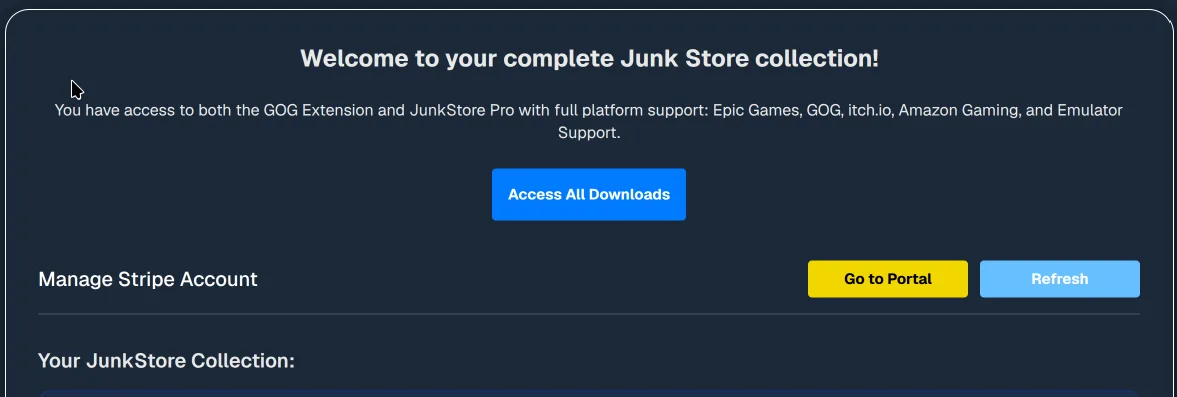
- Scroll to the bottom of the page and click Delete my account.

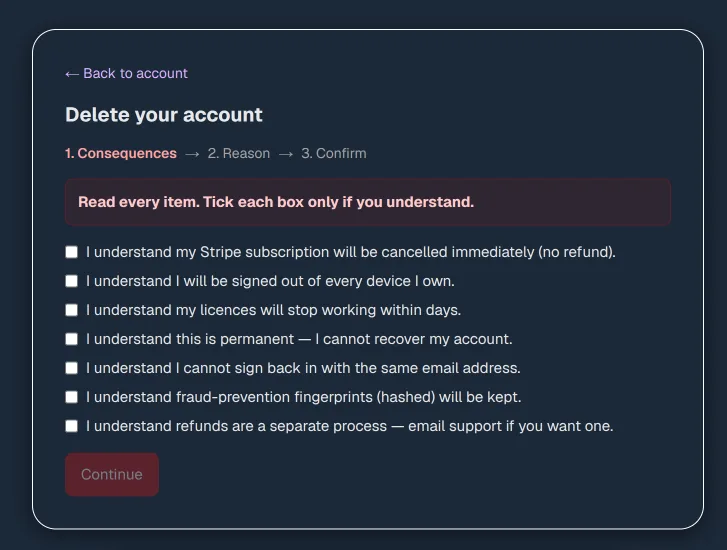
- Consequences: read every item and tick each box to confirm you understand, then click Continue.
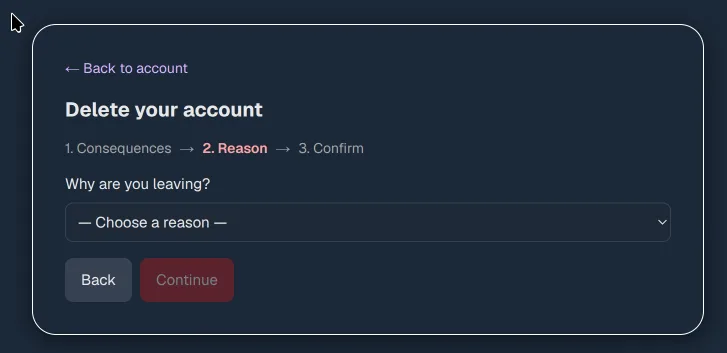
- Reason: choose a reason for leaving, then click Continue.
- Confirm: type your email address to confirm, then click Request deletion.
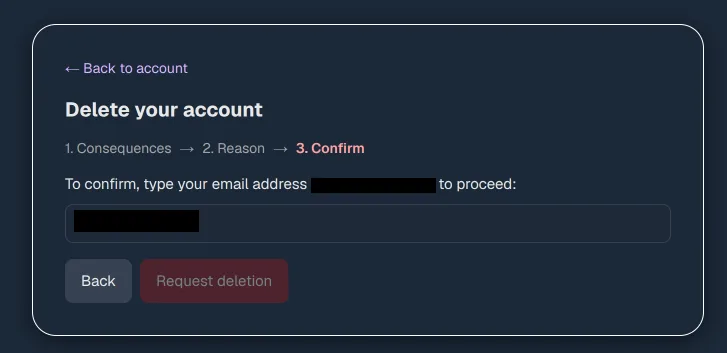
Important: Deleting your account is permanent and cannot be undone. Your Stripe subscription is cancelled immediately, your licences stop working within days, and you lose access to any purchases tied to the account. The email address you used cannot be used to sign up again, so if you want to come back later you will need to register with a different email. Please make sure before you confirm.